If your property changes bank accounts or ownership, you must update your RaccoonPay details.
Please note that updating the billing details in your subscription plan does not update your RaccoonPay payout information. To change where payouts are sent, you must follow the steps outlined in this article.
The process differs depending on whether you are updating bank details for the same company or transferring ownership of the business. This article explains both scenarios and what actions are required.
Before Changing Ownership
If ownership is changing, the current and new owners should first agree on:
The date when payouts to the current owner should stop
The date when payouts to the new owner should begin
This ensures a smooth transition and avoids payouts being sent to the wrong bank account.
Important: RoomRaccoon is not liable for this.
Once the current and new owners have agreed upon the above, let us know through the in-app chat, so we can put the payouts on hold. Keep in mind however that holding the payouts does not stop payments from coming in until the change of ownership documentation starts.
1. Changing Bank Details Only
Please note: this action does not stop payments from coming in, it only affects payouts.
This applies when:
The company/legal entity remains the same
Only the bank account (IBAN) used for payouts changes
How to Update Your Bank Details
You can update your payout information through the RaccoonPay self-onboarding process in your RoomRaccoon account.
Go to Payments > Onboarding & Settings > click on the Update button in the relevant section.
You have two options when updating your bank account.
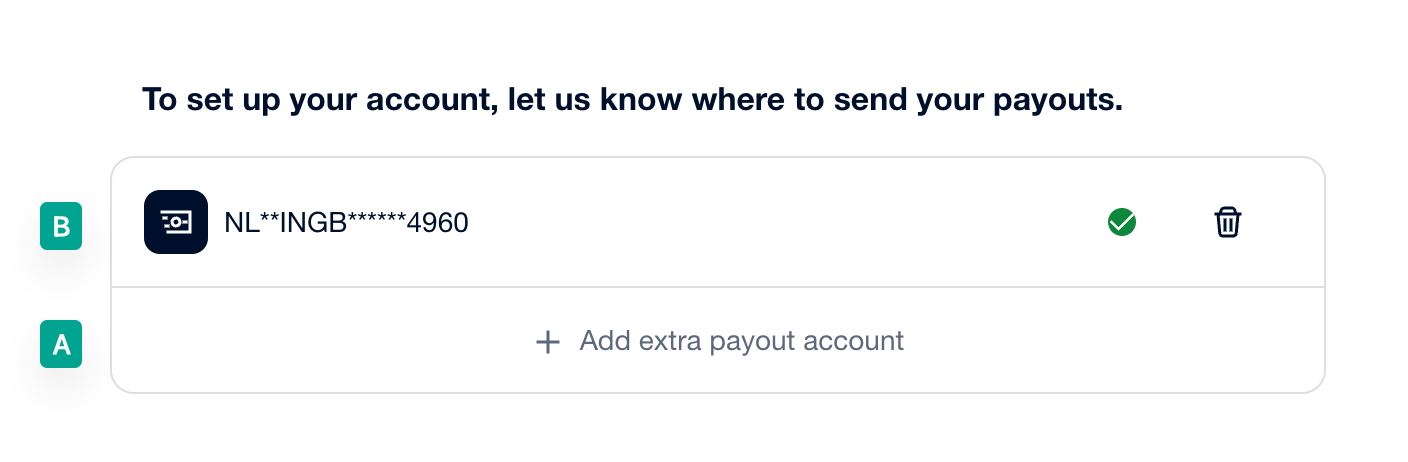
Option A: Add a New Payout Account (Recommended)
Add the new bank account in the Payout Details section.
Wait for the new account to be verified.
Once verified, remove the old bank account.
This option allows payouts to continue going to the existing verified account until the new one is fully approved.
Option B: Replace the Existing Bank Account
You can also edit the existing payout account and replace the IBAN.
Important to know:
The account will become unverified immediately
Payouts will be paused until the new bank account is verified
This option is best if payouts should no longer go to the old bank account.
Important Notes
The new IBAN must belong to the same company or legal entity
Verification requirements are the same as during the original RaccoonPay onboarding
Payouts will resume once the bank account is successfully verified
2. Changing Business Ownership
If your property changes ownership, the RaccoonPay account must be updated with the new owner’s information.
How to Update Ownership Details
The new owner must complete the RaccoonPay onboarding process again and update all required business information.
Why the Existing Account Is Updated Instead of Creating a New One
The existing RaccoonPay account must be updated rather than creating a new one because it ensures continued access to:
Stored payment cards
Pending payouts
Transaction history
Chargeback dispute management
Creating a completely new account would prevent access to this data, however this is only available for new RoomRaccoon accounts; not an existing one.
Important Notes
Once the ownership update process begins, the account may temporarily become unverified
During verification:
Payouts may be paused
Some payments may temporarily fail
It is recommended to start the process only when all required documents are ready
The documentation required is the same as during the original RaccoonPay onboarding.
Need Help?
If you are planning to update your bank details or transfer ownership of your property, please let our team know so we can help streamline the process.
Was this article helpful?
That’s Great!
Thank you for your feedback
Sorry! We couldn't be helpful
Thank you for your feedback
Feedback sent
We appreciate your effort and will try to fix the article